On this page · 8 sections
Quick answer
Use a phone or computer you've signed in on before, from home. Start only from the company's own recovery page: accounts.google.com, iforgot.apple.com, account.live.com or facebook.com/login/identify. Answer every question as best you can, guesses are OK, and send one request, then wait. Nobody can call the company and get you in faster.
Recovery systems score trust signals: familiar device, IP/location and browser, old passwords, recovery factors and account history. Google: recovery-info changes can take up to 7 days. Apple: account recovery waits can run days; signing in on a device cancels it. Microsoft: Sign-in Helper first, then the ACSR form (2 tries a day). Meta: start at facebook.com/hacked or instagram.com/hacked; the security email sent to your old address can undo an email change.
Forgot the password, lost the phone that gets the codes, or someone else got in first? It feels awful, but most accounts can be recovered for free, using the company's own recovery page. Nobody needs to be paid to do it for you.
Easy Mode: recovery playbooks, one company at a time
Takes 10 minutes to start. Some companies make you wait days for safety reasons. Do Step 1 first, then jump to your account.
1. Three rules that help every recovery
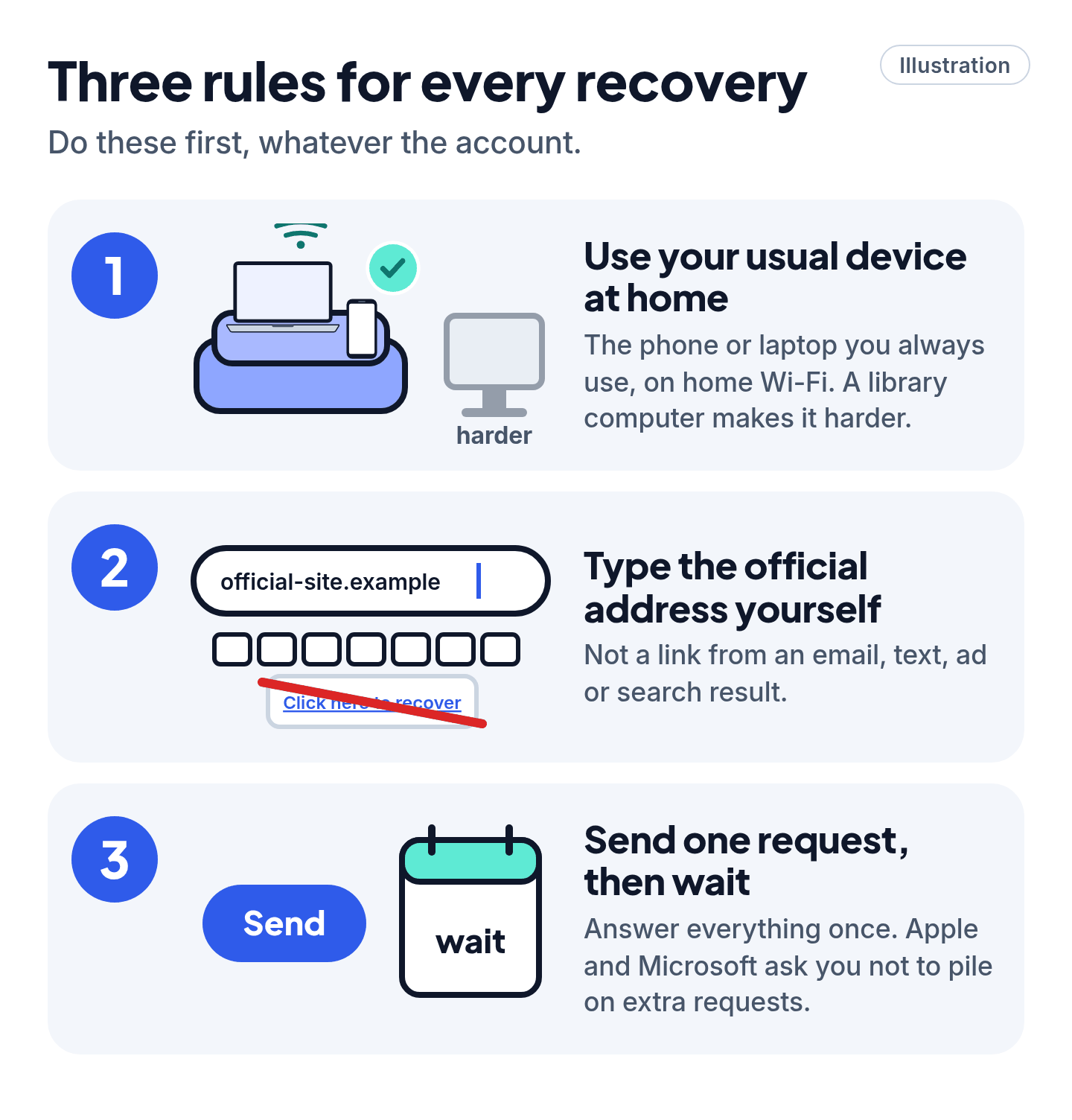
- Use a phone or computer you've signed in on before, in a place you usually use it (like home Wi-Fi). Google, Microsoft and Facebook all say this helps.
- Start only from the official page, typed in yourself: not a link from an email, text, ad or search result.
- Answer everything, then be patient. Guesses are OK. Apple and Microsoft both ask you not to pile on extra requests while one is being reviewed.
Cheat code
Recover from the couch, not the café. The same phone, the same browser and the same home Wi-Fi you always use make you look like you. A borrowed laptop at the library makes you look like a stranger.
2. Google or Gmail
- Start at accounts.google.com and follow the steps for a forgotten password. Forgot the email address itself? Google can find it if you know your recovery phone or email and the full name on the account.
- Answer every question. If you're asked for a password, enter the most recent one you remember. Stuck on a question? Take your best guess rather than skipping it. (If Google sends a code to an inbox or phone you can't use, choose Try another way.)
- Wrong guesses won't lock you out. Google says there's no limit on tries.
- Got an email titled "Your Google support inquiry"? Check your spam folder too.
School or work account? Only your school's or company's IT admin can help.
3. Apple Account (iPhone, iPad, iCloud)
- Have another Apple device that's still signed in (an iPad, Mac or Apple Watch)? Use Forgot password? on the screen or change the password right there. That's the fastest way.
- No device? Go to iforgot.apple.com, or borrow a friend's iPhone and use the free Apple Support app: Support Tools > Reset Password > Help Someone Else.
- Use your trusted phone number, or ask your recovery contact (a friend you set up earlier) for a code.
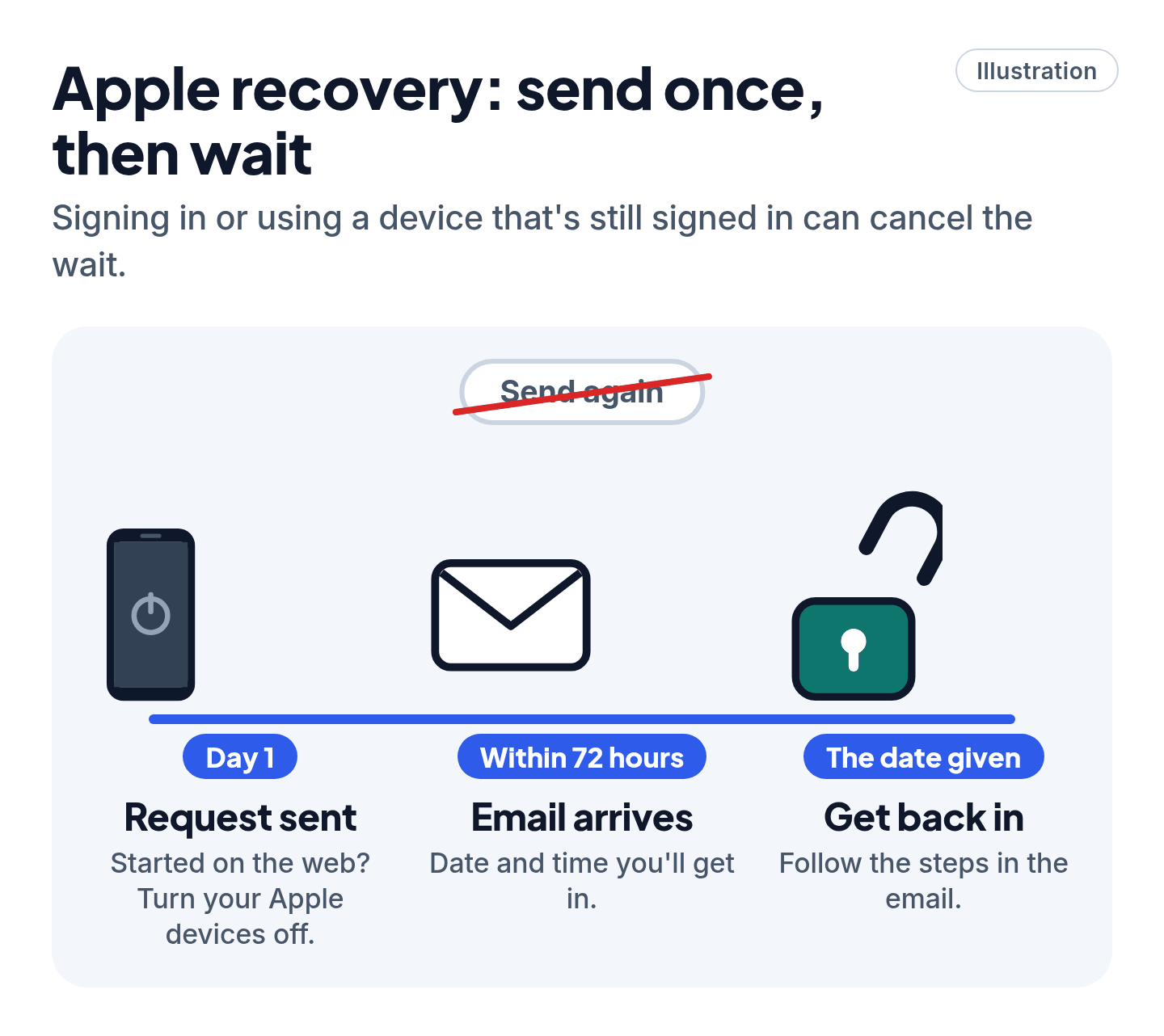
- If none of that works, Apple starts account recovery: a safety wait that can take several days or more. You'll get an email within 72 hours that says when.
Cheat code
During Apple's wait, hands off. Apple says signing in or using a device that's still signed in can cancel the recovery. If you started on the web, Apple says to turn off all your Apple devices until it's done. Check the status at iforgot.apple.com.
4. Microsoft account (Outlook, Hotmail, Xbox, Windows)
- On the sign-in screen, choose Forgot password?, pick where to get a code, enter it, and set a new password.
- Can't get a code? Use Microsoft's free Sign-in helper (aka.ms/sign-in-helper).
- Still stuck? Fill in the account recovery form at account.live.com/acsr. You'll need a different email address that works (you can make a free Outlook.com one). Microsoft replies within 24 hours.
- "Your account has been locked"? Sign in at account.microsoft.com and follow the steps. If you don't get that option, select the reinstatement link (it starts with aka.ms/) shown in the sign-in window and send the form once.
5. Facebook and Instagram
- Think you were hacked, even if you're not sure? Start at facebook.com/hacked or instagram.com/hacked.
- Someone changed your email? Look in your old inbox for the security email. Instagram sends it from security@mail.instagram.com, with a link to secure your account.
- Forgot your password? On the login screen, tap Forgot password? and search with your email, phone number or username. On Facebook, you can also start at facebook.com/login/identify on a device you've used before.
- No longer have that email or phone? Look for No longer have access to these? and add new contact details that you've never used on the account.
6. Back in? Lock the door behind you
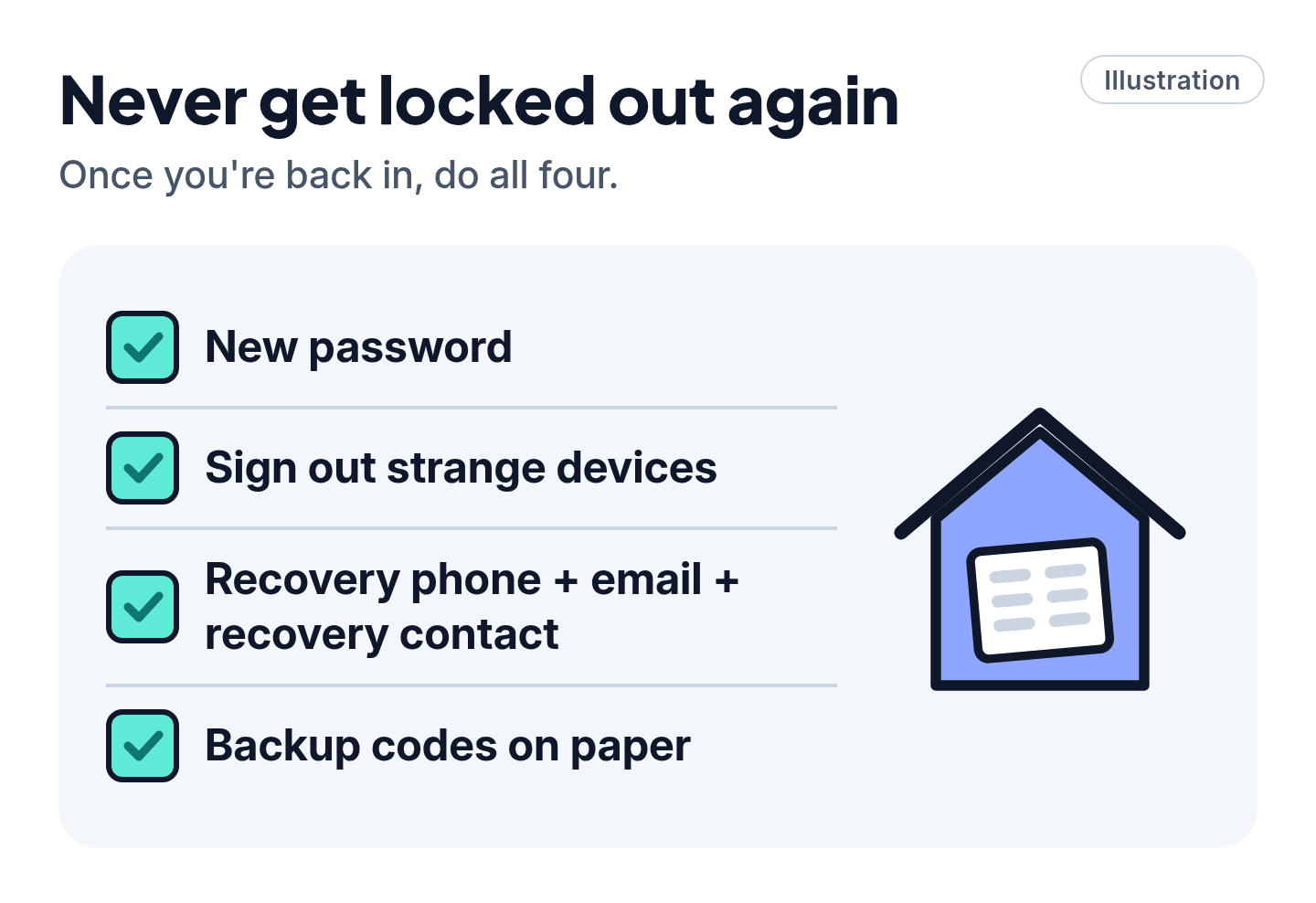
- Change the password, and change it anywhere else you used the same one.
- Check for strangers: sign out any devices you don't recognize (Google: Your devices; Facebook: Where you're logged in).
- Add a backup way in: an up-to-date recovery phone and email, plus a recovery contact (Google and Apple both offer one).
- Save backup codes for two-step sign-in on paper, somewhere safe at home.
Skip the "recovery experts"
Scam warning
- There's no number to call to get back in. Google has no phone line for sign-in help, and it doesn't partner with any "account recovery" service. "Support numbers" in search ads, social posts and comments are often fake.
- Nobody can skip the wait. Apple says its own support team can't shorten account recovery. Microsoft's support agents can't send you a reset link either. Anyone selling a shortcut is lying.
- Never share a code or password. Google says it will never ask for them by email, phone or message. A code sent to you is only for you to type into the official site.
- Ignore "hackers" who offer to recover your account for a fee or in crypto. Don't pay anyone, and don't buy anything. Every real recovery tool in this guide is free.
Still stuck? Here's what's left
- Google: try again from your usual device and place, after any recent changes to your recovery info have had time to settle. Changes can take up to 7 days.
- Apple: wait for the date in the email. Don't start a new request.
- Microsoft: you can send the recovery form up to two times a day. Add more detail each time (see Pro Mode).
- Instagram, with no access to the email and no Facebook link: Instagram says it can't give access. Try recovering the email account itself first, with your email provider.
- No way back at all? Google says you can make a new account. Then tell your contacts your new address.
Pro Mode
Pro Mode Pro Mode: what recovery systems look for, and the edge cases
Give the forms what they score. Google and Microsoft look for a familiar device, browser and location, plus details only you'd know. Microsoft's form asks about old passwords, your email contacts, exact subject lines of emails and, for gamers, the hardware ID of an Xbox you use a lot. Wrong guesses don't count against you. Results go to your working contact email within 24 hours.
Two-step sign-in with no backup method. Microsoft says if two-step verification is on and you've lost every way to get codes, "we cannot help you." On Facebook, the two-factor phone number can't also be used to reset your password. Approve the login from another device you're still logged into, or use a saved recovery code. On a computer, Need another way to authenticate? shows more options.
Instagram backup codes (do this now, while you're in). More > Settings > Accounts Center > Password and security > Two-factor authentication > choose the account > Additional methods > Backup codes. Meta is moving some people to "Meta Account settings," so the name may differ.
Apple recovery key: think twice. A 28-character recovery key turns off standard account recovery. If you lose the key and your trusted devices, Apple says you could be locked out for good. Apple says not to store it in the Passwords app, iCloud Photos, Notes or iCloud Drive. Recovery contacts (Settings > [your name] > Sign-In & Security > Recovery Contacts, up to five, iOS 15 or later) are the gentler option for most people.
Google: recovery info delay. New recovery phones, emails and passkeys can take up to 7 days to become trusted. If you already have a passkey or security key, you can approve new methods at myaccount.google.com/security to speed it up.
Microsoft "security info change is still pending." If all your security info is replaced, the account goes into a 30-day waiting period. If you didn't make the change, sign in to your account's Security page and, in the "still pending" window, choose let us know. (If you did make it, cancel this request ends the wait.)
After a hack, check the quiet stuff. Hackers often set up email forwarding, filters, delegated access or automatic replies so they can keep reading your mail. Check those in Gmail and Outlook. Google's Security & sign-in > Recent security events lets you mark activity "No, it wasn't me." Microsoft suggests running a full scan first (Windows Security > Virus & threat protection > Scan options > Full scan > Scan now), then changing the password.
You've got this
Recovery is slow because it's safe. Use your usual device, type the official address, answer honestly, send it once and wait. You never need to pay a stranger to get your own account back.
Sources
The 25 pages we checked
- Google Account Help: How to recover your Google Account or Gmail
- Google Account Help: Tips to complete account recovery steps
- Google Account Help: How to secure a hacked or compromised Google Account
- Google Account Help: Avoid getting locked out of your Google Account
- Apple Support: If you forgot your Apple Account password
- Apple Support: What to expect when you use account recovery
- Apple Support: If your Apple Account is locked, not active or disabled
- Apple Support: How to set up a recovery contact
- Apple Support: How to generate a recovery key
- Microsoft Support: Reset a forgotten Microsoft account password
- Microsoft Support: Microsoft account Sign-in helper
- Microsoft Support: Help with the Microsoft account recovery form
- Microsoft Support: Microsoft account has been locked
- Microsoft Support: How to recover a hacked or compromised Microsoft account
- Microsoft Support: What does "security info change is still pending" mean?
- Facebook Help Center: Account recovery
- Facebook Help Center: Recover your account if you can't access the email or phone on it
- Facebook Help Center: If you think your account was hacked
- Facebook Help Center: Troubleshoot two-factor authentication
- Facebook Help Center: Change your password
- Instagram Help Center: If you think your Instagram account has been hacked
- Instagram Help Center: instagram.com/hacked
- Instagram Help Center: I can't log in
- Instagram Help Center: Lost access to email or phone number linked to Instagram account
- Instagram Help Center: How you can use a backup code on Instagram
More free guides are on the way.